
[질답/버그/제안] 리스트에서 라디오버튼으로 수정방법
작성자 정보
- 관리자 작성
- 작성일
컨텐츠 정보
- 269 조회
-
목록
본문
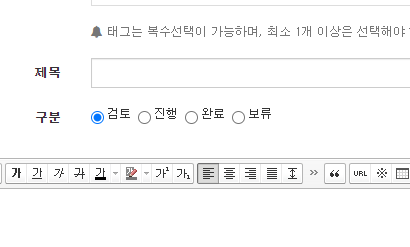
기존에 있던 내용 참고해서 만들려고 하는데.. 잘 안되네요. 혹시 어떻게 해야 될까요?
작성
<?php if($wr_1) ?>
구분 :
<?php echo $view['wr_1']; //구분 ?>
.wr-radio { margin-left:3px; margin-right:7px; }
<?php
function wr_radio($radio_wr, $radio_str, $radio_req) {
global $write;
return "
n = " . explode('_', $radio_wr)[1] . ";
document.write('');
this['radio_' + n] = ('" . $radio_str . "').split(',');
this['radioValue' + n] = '" . $write[$radio_wr] . "';
document.write('');
for (this['name_' + n] of this['radio_' + n]) document.write('' + this['name_' + n] + '');
document.getElementsByName('_' + n)[document.getElementsByName('_' + n).length - 1].style.marginRight = '0px';
this['radioReq_' + n] = " . $radio_req . ";
for (this['_' + n] of document.getElementsByName('_' + n)) {
this['_' + n].checked = this['wr_' + n].value == this['_' + n].value;
this['_' + n].onclick = function() {
window['wr_' + n].value = this.value;
}
}
if (this['radioReq_' + n] && this['wr_' + n].value == '') {
document.getElementsByName('_' + n)[0].checked = 1;
document.getElementsByName('_' + n)[0].onclick();
}
document.write('');
";
}
?>
관련자료
-
링크